🔱 Custom Trident
Nexo allows you to make custom tridents and trident-projectiles.
This feature will work best on 1.21.4+ servers but will also work on lower ones
The Trident-mechanic is pretty straight-forward, but also has some optional properties, mainly applicable to lower versions.
By default any item using TRIDENT as it's material is a Custom Trident
The Trident-Mechanic is not strictly necessary unless one wants to tweak the properties
Properties
thrown_item_model - The ItemModel to show on the Trident-projectile.
Unspecified defaults to Components.item_model if specified.
thrown_item - Refers to the NexoItem to display for the Projectile.
Defaults to the item of this mechanic if unspecified
display_transform - Lets you set the Transform the model should use
rotation - Lets you rotate the base yaw/pitch of the projectile
damage - The base-damage the Trident will do when hitting an entity, defaults to 8
sounds - The sounds the Trident should make, defaults to replicating vanilla.
Trident Sounds
forest_trident:
  Mechanics:
    trident:
      sounds:
        throw: my.throw.sound
        hit: # Optional format for specifying volume and/or pitch
          sound: my.hit.sound
          volume: 1.1
          pitch: 1.0 # Optional, defaults to 1.0
        #hit_ground: my.hit_ground.sound
        ##return: my.return.sound
Info
If you are unsure how to reference a ResourcePack-File in a NexoItem config;
How do I reference a ResourcePack file in a config?
For 1.21.4+ servers there are two approaches you can take, one being manually making the ItemModel, or let Nexo do it for you.
You will need 2 Models and 1 NexoItem-Config at minimum.
Simple Method
The simplest method is to let Nexo generate the ItemModel for you. For this you will need a NexoItem-Config like shown below. This specified a model & throwing_model in Pack, which Nexo will use when making the ItemModel. The throwing_model is usually the same as the model, but flipped in hand in programs like BlockBench
forest_trident:
  itemname: Forest Trident
  material: TRIDENT
  Pack:
    model: nexo:item/nexo_tools/forest_trident
    throwing_model: nexo:item/nexo_tools/forest_trident_throwing
  Mechanics:
    trident:
      display_transform: HEAD
Manual Method
If you want to manually provide the ItemModel you will need a simplified config like below;
forest_trident:
  itemname: Forest Trident
  material: TRIDENT
  Components:
    item_model: nexo:forest_trident
  Mechanics:
    trident:
      display_transform: HEAD
The Forest Trident Nexo comes with uses a unified ItemModel to dictate when to show what model.
This is mainly for displaying a different model when held/icon/throwing.
Like the normal trident-item, which has a 2d Icon in GUIs, then also held in hand one way when throwing and normal.
Below is the example Forest-Trident ItemModel Nexo comes with:
{
  "model": {
      "type": "minecraft:condition",
      "property": "minecraft:using_item",
      "on_false": {
        "type": "minecraft:model",
        "model": "nexo:item/nexo_tools/forest_trident"
      },
      "on_true": {
        "type": "minecraft:model",
        "model": "nexo:item/nexo_tools/forest_trident_throwing"
      }
    }
}
This has a different Model based on the condition if the item is being used or not.
This then goes into assets/nexo/items/forest_trident.json and is referenced in the NexoItem like below
As shown above this ItemModel then links to two separate normal JSON-Models:
assets/nexo/models/item/nexo_tools/forest_trident.json
assets/nexo/models/item/nexo_tools/forest_trident_throwing.json
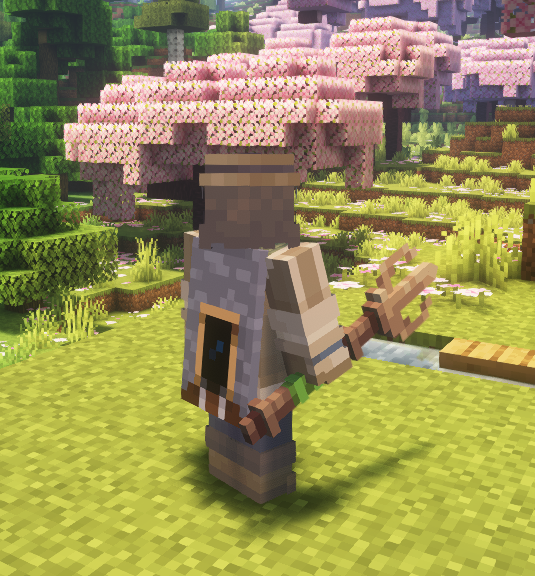
Forest Trident with the normal default Model
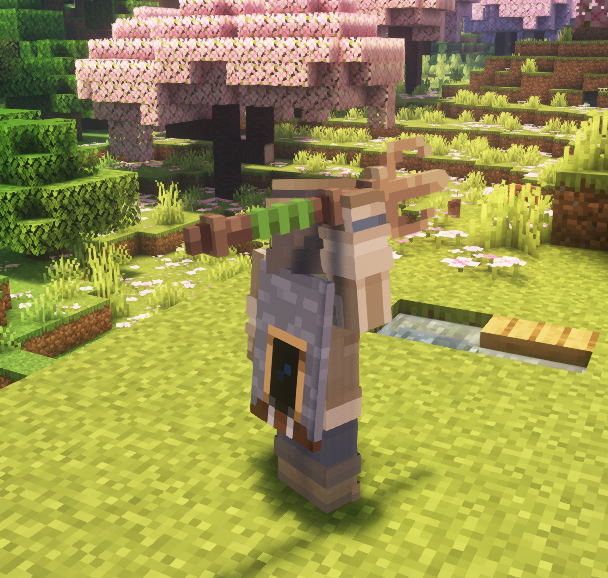
Forest Trident in the "throwing" model, rotated
forest_trident:
  itemname: Forest Trident
  material: TRIDENT
  Pack:
    model: nexo:item/nexo_tools/forest_trident
  Mechanics:
    trident:
      thrown_item: forest_trident_throwing
      display_transform: HEAD

forest_trident_thrown:
  excludeFromCommands: true
  excludeFromInventory: true
  Pack:
    model: nexo:item/nexo_tools/forest_trident_throwing