ItemModel Builder
For starters, what is an ItemModel? ItemModels are the new way, as of 1.21.4+, to tell the client what to show and when, for an Item. For example show Model A when an item has CustomModelData 1 and another when it does not have any.
If you only support 1.21.4+, using custom ItemModels for all your NexoItems is the ideal way to prevent conflicts. You can read more about switching here: ItemModels vs. CustomModelData
Now how does this feature work and what can you do with it? More or less anything.
Nexo already does this for a lot of individual properties defined in Pack.
Like showing a different model when in GUI vs held in hand, when dyed and undyed, when throwing and not throwing a trident etc.
ItemModels are made up of different sub-types; Reference, Select, Condition, RangeDispatch, Composite, Empty & Special.
Each of these serve a different purpose for different usecases
For information about each type, recommend reading Minecraft Wiki.
Basic Example
For a basic example I will show how normally CustomModelData would be used in the vanilla ItemModel.
Say you have an item with the material PAPER & CustomModelData 123. Nexo would then add into the vanilla ItemModel of Paper a condition for when this property has this value.
{
  "model": {
    "type": "minecraft:range_dispatch",
    "property": "minecraft:custom_model_data",
    "entries": [
      {
        "threshold": 123,
        "model": {
          "type": "minecraft:model",
          "model": "namespace:key"
        }
      }
    ],
    "fallback": {
      "type": "minecraft:model",
      "model": "minecraft:paper"
    }
  }
}
In this scenario you would be overriding the vanilla ItemModel for Paper if a condition is met. This is the same logic as has been used since 1.16.
The new way to make custom items is making a unique ItemModel for each custom item, dodging the need for CustomModelData & overriding vanilla models. This ensures least amount of conflicts, as each ItemModel is unique. ( ItemModels vs. CustomModelData )
How do I use this feature?
It is pretty straight forward. Below is a rough example of how to use it.
Say you want to make an Item that shows a different Model for certain events or holidays.
Like a plushie with a Christmas hat on in the month of December.
plushie:
  itemname: Plushie
  material: PAPER
  ItemModel:
    ## Composite ItemModels stack Models ontop of eachother
    type: composite
    models:
      - type: model
        model: minecraft:plushie
      - type: select
        property: local_time
        pattern: MM ##Month 01-12
        cases:
          ## When the Month for the client is December, show Christmas Hat Model too
          - when: "12"
            model:
              type: model
              model: minecraft:christmas_hat
        ## When no case matches, fallback to showing nothing
        fallback:
          type: empty
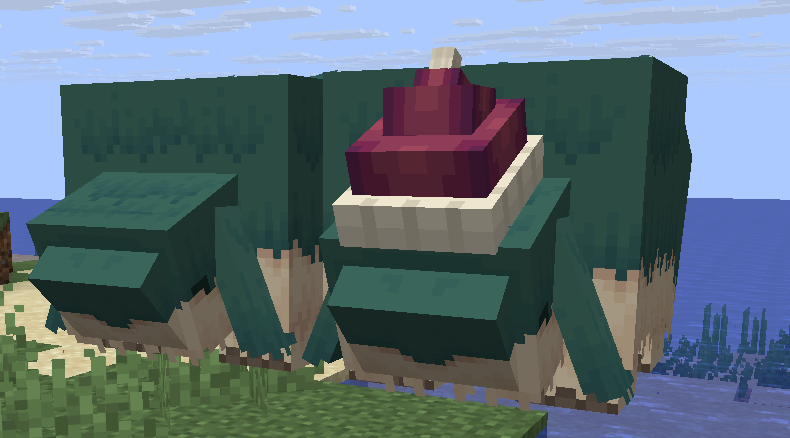
Same item for what it would look like in December & otherwise with no changes needed