⚒️ Items
Components
As of Minecraft 1.20.6, items now use what is called Components, or DataComponents, to specify specific features. This covers anything from consumable items, tool-properties and death protection.
You can see a complete list here: Components
ItemTemplate
This allows you to easily copy properties from a template-item onto other items.
In the item you want to copy properties to, simply specify the ItemID
It also supports a list of multiple items to merge several into one
template_item:
  itemname: Template Item
  material: DIAMOND

template_item1:
  template: template_item
  itemname: Template Item 1

template_item2:
  templates:
    - template_item
    - template_item1
You can also use Template Placeholder to simplify configs even further
<item_id> - Can be used to insert the ID of the item into the relevant part
<item_id_capitalized> - Insert the ID in a formatted format; item_id -> Item Id
<lore> - Insert the lore of the item at a point in the lore of the template
item:
  template: template_item
another_item:
  template: template_item
  lore:
    - "some lore"
template_item:
  itemname: <item_id_capitalized>
  Components:
    item_model: nexo:<item_id>
  lore:
    - "template lore 1"
    - "<lore>"
    - "template lore 2"
ItemModel Builder
This lets you generate an ItemModel for your NexoItem without needing to provide the ResourcePack file. You can directly reference all you need right in the config. More detailed info can be found at https://github.com/Nexo-MC/Nexo-Documentation/blob/master/configuration/items/items/README.md#itemmodel-builder
PersistentData
This lets you add custom data into the items PersistentDataContainer. These exist within the PublicBukkitValues of the item.
Type is the type of data to add. Supported types can be found here.
Nexo also has some custom DataTypes which can be used, like UUID. These can be found here
There is also a CustomData Components if setting things outside of the normal PublicBukkitValues-entry for the item is wanted
Item Name
This allows you to change the name displayed of your item without interfering with renamed items.
Material
This allows you to change the item type. Defaults to PAPER if unspecified.
AttributeModifiers
This allows you to add minecraft attributes to your item. They are very powerful and allow you to make an item that adds hearts, increases the player's speed, etc.
my_item:
  AttributeModifiers:
    - attribute: MOVEMENT_SPEED
      amount: 0.1
      operation: ADD_NUMBER
      slot: MAINHAND
      display: # 1.21.6+ only
        type: override
        text: "Value: <red>0.1"
List of Attributes can be found here
List of Operations can be found here
List of Slots can be found here
The types of AttributeDisplay are; default, hidden & override
Of these only override has an additional field, text, which is the new text to show
Color
This allows you to change the color of an item made of a supported material (e.g. leather armor).
Warning
Minecraft 26.3 removed the map_color-component, so filled maps can no longer be colored on that version and above
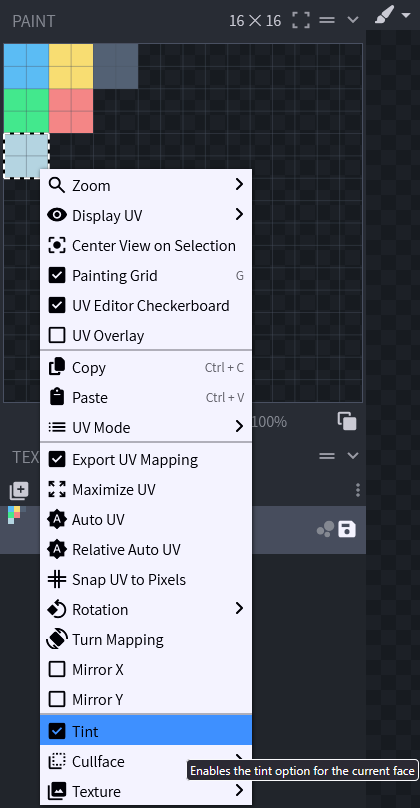
To change the color of your model, you need to set Tint property.
How to set Tint property using BlockBench:
- Open the model in BlockBench
- Open Paint Tab
- Select face you want to change color
- Right click on the face and check
Tintbox
Lore
This allows you to add lines of text under the item name.
Disable Enchanting
To prevent an item from being enchanted, use the Enchantable-Component with a value of 0.
This does not prevent enchantments from being applied in the config.
Vanilla only blocks the enchanting table this way.
With Misc.extended_enchantable enabled in settings.yml (the default), Nexo also blocks enchanting the item in anvils and disenchanting it in grindstones.
Info
disable_enchanting was removed in Nexo 1.29.
Items still using it are converted to Components.enchantable: 0 automatically
excludeFromInventory
This option allows you to exclude an item from the nexo inventory. It will no longer be displayed but you can still get it using nexo give command. It is useful for items used in other plugins like inventory icons.
unbreakable
Leaving it out keeps whatever the item already has, so items made unbreakable by another plugin stay unbreakable when Nexo updates them.
Set it to false to always remove it.
ItemFlags
Warning
As of 1.21.5+ this should be switched with Components.tooltip_display https://github.com/Nexo-MC/Nexo-Documentation/blob/master/configuration/items/items/README.md#components
This allows you to set ItemFlags to an item, get the list of available flags here.
my_item:
  ItemFlags:
    - HIDE_ENCHANTS
    - HIDE_ATTRIBUTES
    - HIDE_UNBREAKABLE
    - HIDE_DESTROYS
    - HIDE_PLACED_ON
    - HIDE_POTION_EFFECTS
Enchantments
If you want to enchant your item (even with non vanilla levels like for example sharpness 15), you can do it with this section. This should also support Enchantment Plugins that register enchantments as proper ones, using namespace:key
How do I set a specific CustomModelData?
my_item:
  Pack:
    parent_model: "custom/items/generated_elite"
    texture: custom/items/elite_zombie_walk
    custom_model_data: 452
Pack options
This part has a dedicated page, you can consult it here.
Mechanics options
Mechanics are custom features in Nexo. You can find more under https://github.com/Nexo-MC/Nexo-Documentation/blob/master/configuration/items/broken-reference/README.md section